What is Event Loop and why we need it ?
There was a time when hardware resources were expensive, like “you can go broke” expensive. Developers had to manually manage the memory and do bunch of other stuff, which we take for granted today, to make sure the system works in that tiny resource requirement. People used to land on moon for 4kb-of-memory( Today you can’t even load that viral meme for that much ). If you were to travel back in time and tell the poor programmer that everyone will be carrying multicore computers in their pockets, he/she might take you for a royalty and pledge fealty to you. Then you proceed to tell that despite all that super power, UI is still ran single threaded by all major UI systems, including your favorite browser. You might get the most wtf look in the history.
Ideally we all want to live in an utopia where you can run things concurrently without causing issues which makes one pull out their hair. We also want unicorns to fart rainbows but that doesn’t happen as well. User Interface needs to be 100% predictable and reliable. That means rendering/drawing of pixels and event must happen in a single thread. Let’s assume that rendering and events handling is happening in separate threads, which one should happen first, rendering or event handling ? We have to manage communication between these threads for that and we all know how much fun it /s.
Eventloop is a way JavaScript runtime systems like V8 or Node handles asynchronisity. There are many events for which you can not freeze the UI. For example, an API call was made to download the file. Once the request is made, there is no guarantee when the responsive will arrive or arrive at all for that matter. If UI is frozen this whole time, it would be a really bad user experience.
Comes the Event Loop in the picture
V8 engine running in Chrome manages asynchronisity ? Simple, let the OS do all the heavy lifting like sending the request and handling the response when it first arrives over the wire. We will examine a simple code snippet below and try to visualize the path it takes from single threaded JavaScript stack to WebAPI and ultimately to Event Loop.
console.log("woff !!");
setTimeout( ()=> { console.log("Meow Meow !!") }, 0 );
console.log("woff woff woff !!")
Output
woff !!
woff woff woff !!
Meow Meow !!
huh !!! but wait !!! didn’t we supplied 0 to setTimeout thus asking it to execute immediately ? Well… not really. Let’s take a look at it why by understating the definition of EventLoop.
An Event Loop is
- Continuously running
- Monitoring the Call Stack to check if it is empty
- Push the event from the FIFO queue to Call stack which will eventually run it
- and rinse and repeat.
Let’s look at each step in detail to understand it.
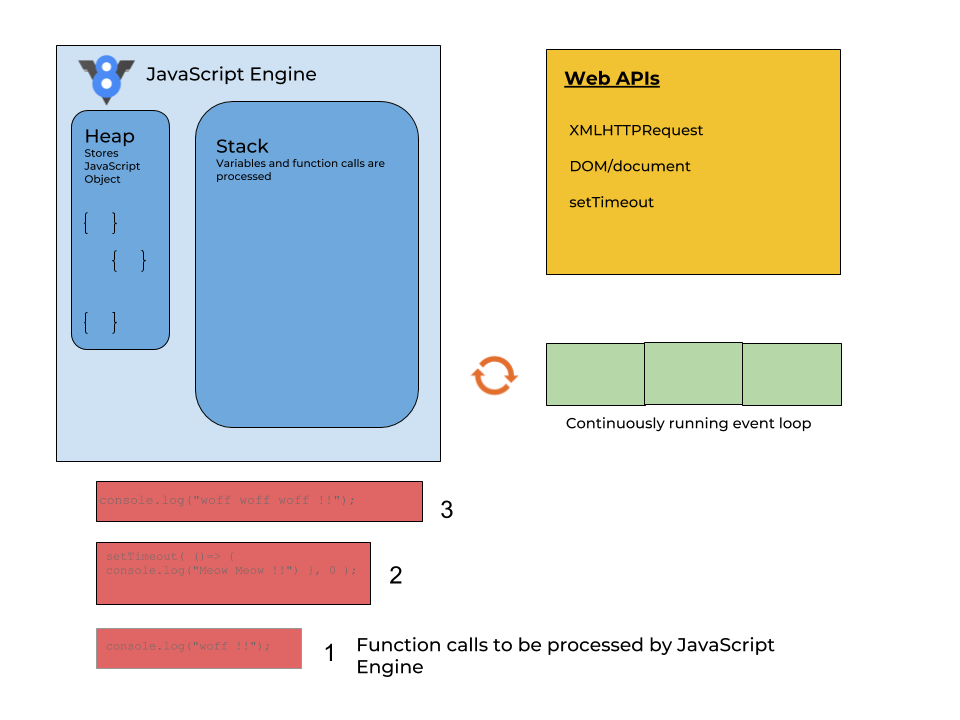
Continuously running
Javascript engine encounters the first line -
console.log("woff !!");and recognize it as a synchronous javascript feature and push it to the call stack. (Note:- We’ll only focus on stack for our exercise now.)It then encounters second line -
setTimeout( ()=> { console.log("Meow Meow !!") }, 1000 );. Now setTimeout is not technically part of the ECMAScript spec( Surprise !! ). It exposed as a part ofwindowobject. There is something calledWEB Apiin every browsers which supports common functionalities mistaken as part of JavaScript standards, LikeDOM/document, XMLHTTPRequest, setTimeoutetc.
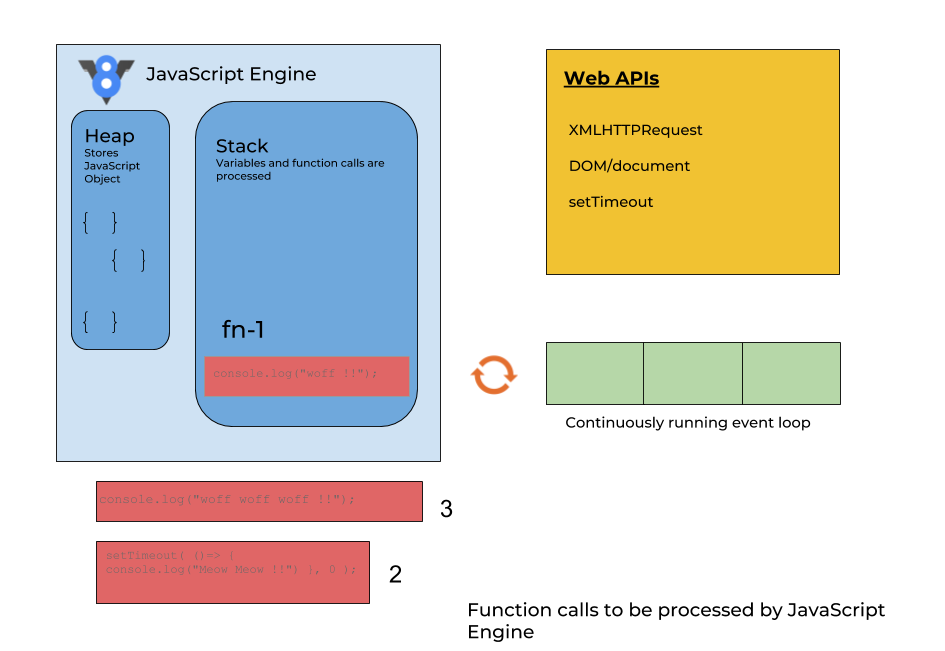
- Since setTimeout is part of webApi, it is being pushed to the FIFO Queue and the javascript execution continues.
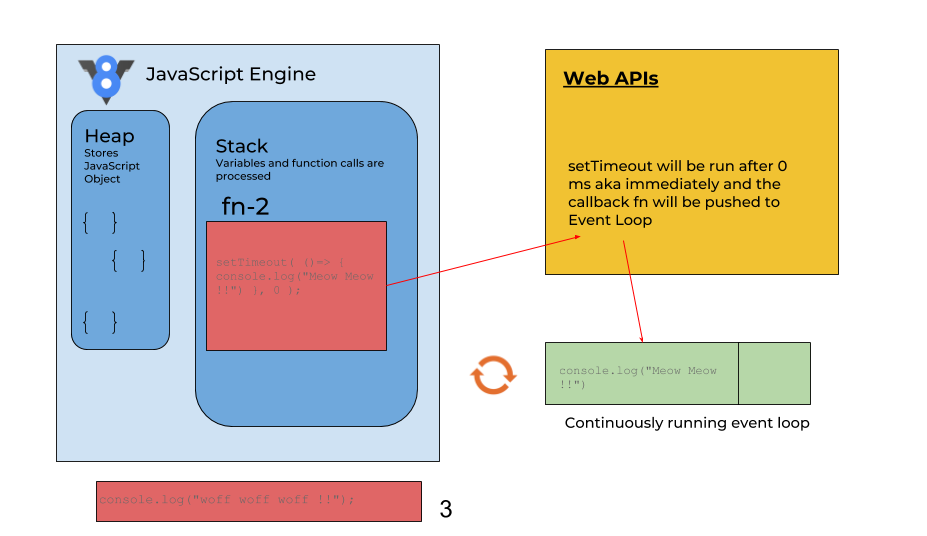
It encounters the last line -
console.log("woff woff woff !!")and pushes to the call stack.Since we passed
0tosetTimeout, It pushes the callback function -()=> { console.log("Meow Meow !!") }from the queue to Event Loop.
Monitoring the Call Stack to check if it is empty
- Before pushing the callback to javascript engine’s call stack, Event loop first verifies that it isn’t executing something else. This is the reason event though we pass
0to setTimeout, it didn’t executed immediately. First it waited for call stack to be empty by executing first and third console logs. (Angular 1.x dev might remember calling$timeoutfunction after handling some async task to force to go through the compile loop again.)
Push the event from the FIFO queue to Call stack which will eventually run it
- Once the Javascript engine’s call stack is empty, Event queue pushes the
console.log("Meow Meow !!")on stack and from then on it is treated as just another function call.
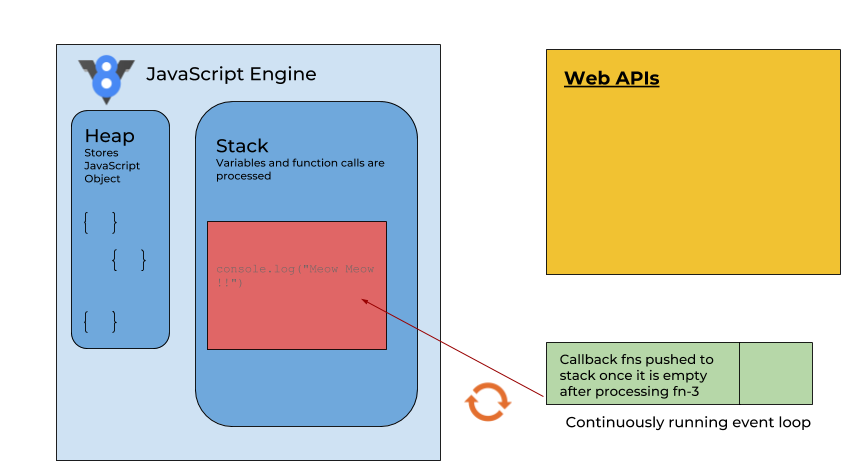
Rinse and Repeat
And this cycle continuous for every asynchronous action. Moreover, whenever you attach the mouseup or mousedown listener, those calls are on FIFO queue until the end of life-cycle and whenever it gets user actions from underlying OS, it keeps pushing those events on queue.
Conclusion
We have barely scratch surface of Asynchronous programming in JavaScript. One really needs to understand Promises and more recently async await to figure out how to handle and write clean async code. Understanding the fundamentals of Event Loop is very important because this the brick upon which foundation of many frameworks and libraries are built. For example, node js has adopted an event based architecture where everything is a reaction to an event. It’s a cavalcade of callbacks and having a clear understanding of Event Loop makes it easier to learn and understand Node.